How do I change a profile's role on a team?

What roles are there?

A person can have several team affiliations with different roles, but only 1 role on the same team. There are 6 roles:


- Coach: all team functions, can create other coaches and has access to selected club functions


- Assistant: All team functions, can create other coaches and has access to selected club functions


- Team Manager: All team functions, CANNOT create coaches and CANNOT access club functions


- Member: access to his/her own team(s), cannot create/modify activities/other profiles


- Inactive: member not receiving emails, cannot sign up for activities


- Injured: member not receiving emails, cannot sign up for activities
Det finns inget svar på den här frågan om användningen av SportMember från appen.


Open Club Members and Edit

  1. Click on   Club in the top left corner
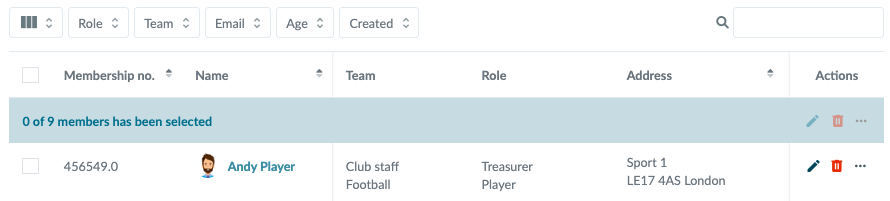
  2. Click on Members
  3. Click on  to the right of the member's name in the Actions column
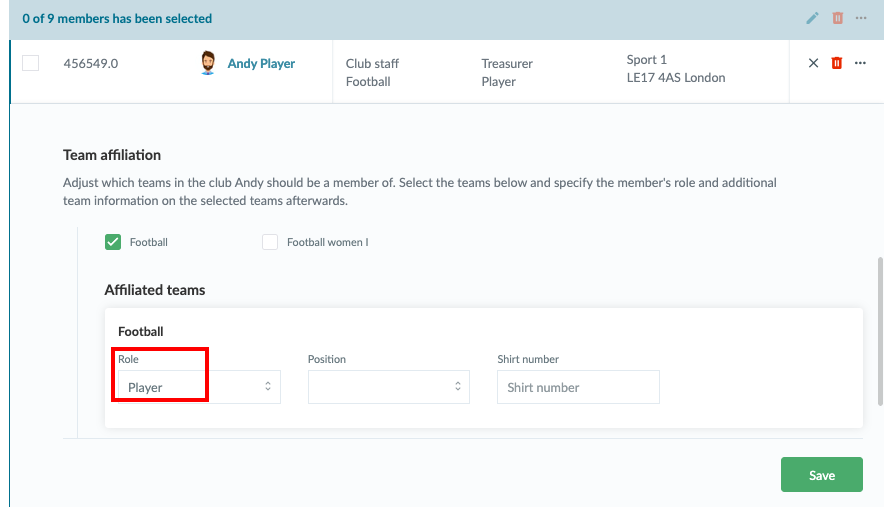
  4. Find the Team affiliation and under that Affiliated teams 
  5. There you can select a role
  6. Finish with the green Save button


Note: If the person wants to keep his/her role on the team, but at the same time have a new role on another team, first add to the other team if he/she is not already on this team. Then you can now change the role on the given team


Var denna artikel hjälpsam?
1 av 1 tyckte att det här var hjälpsamt

Är du redo att börja?

Utforska SportMember, eller skapa ett konto nu och börja hantera din klubb. Du kan också kontakta oss för att få hjälp med att starta din klubb.
Vad kostar det?
Vilka är klubbens behov? Basic- eller PRO-prenumeration?
Priser
Funktionsoversigt
Ingen klubb är den andra lik. Våra funktioner täcker dina behov.
Funktionsoversigt